a Begin by writing an equation that represents the average cost. Then, use the trace feature of the graphing calculator.
B
b Use the table feature of the graphing calculator.
A
a 50 students
B
b The average cost approaches $20
Practice makes perfect
a We will begin by writing an equation that represents the average cost. Let y be the average cost and x be the number of students that use the program.
Verbal Expression
Algebraic Expression
Initial cost ($)
500
Cost for x number of students ($)
20 x
Total cost ($)
20 x+500
Average cost is $y.
y=20 x+500/x
We now have the equation.
y=20x+500/x
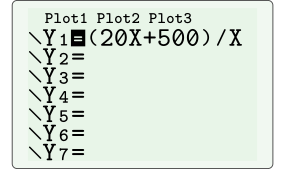
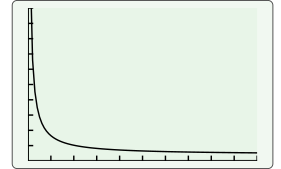
Next we will graph the equation. To draw a graph on our calculator, we first have to press Y= and write the function on one of the rows. Having written the function, we can press GRAPH to draw it.
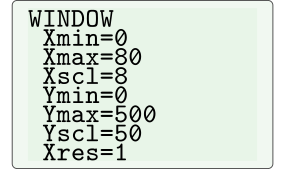
To observe the graph properly, we can set the viewing window as shown below.
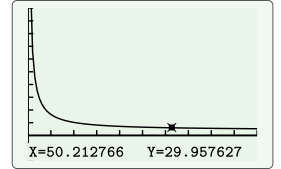
Now we press TRACE, and then use the right and left arrow keys to move along the graph to get y≈ 30.
The average cost falls to $30 per student when 50 students use the program.
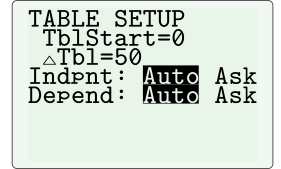
b To examine the average cost as more students use the program, we will use the table feature of our graphing calculator. We will first change the table settings as below by pushing 2ND and WINDOW.
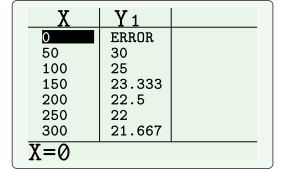
Now, we will push 2ND and GRAPH to see the table.
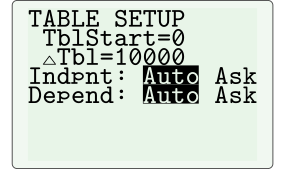
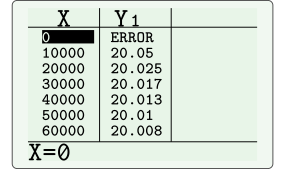
Let's also examine the average cost for a greater number of students by setting up the table as below.
The tables show that the average cost approaches $20 as more students use the program.